
Dorico’s weird behavior about chord symbols in big band and wind ensemble scores

Updated: Sep 10
We encountered an interesting issue during a recent Dorico lesson at our company. When attempting to input chord symbols for a melodic instrument, "multiple chord symbols that had been entered for a rhythm section instrument would suddenly appear all at once".
The standard method for inputting chord symbols for melodic instruments in Dorico
The standard procedure for inputting chord symbols for instruments other than the rhythm section in Dorico involves: (1) selecting a range and choosing "Write > Create Chord Symbol Region" from the menu; and (2) selecting the relevant player in Setup mode, right-clicking, and setting the option to "Chord Symbols > Show in Chord Symbol and Slash Regions." (The order of these steps does not matter.)※
※In Finale, it was possible to input different chord symbols for different staves on the same beat—allowing, for instance, a deliberate clash between C7 and C#7. Dorico, however, manages chord symbols globally across the entire piece; the underlying concept is to input a single chord symbol and then configure its visibility for each player individually. That said, by holding down the option/alt key while pressing Enter, it is possible in Dorico to input a chord symbol on a specific staff that differs from the others, just as in Finale.
Behavior when attempting to input chord symbols by intuitive operations
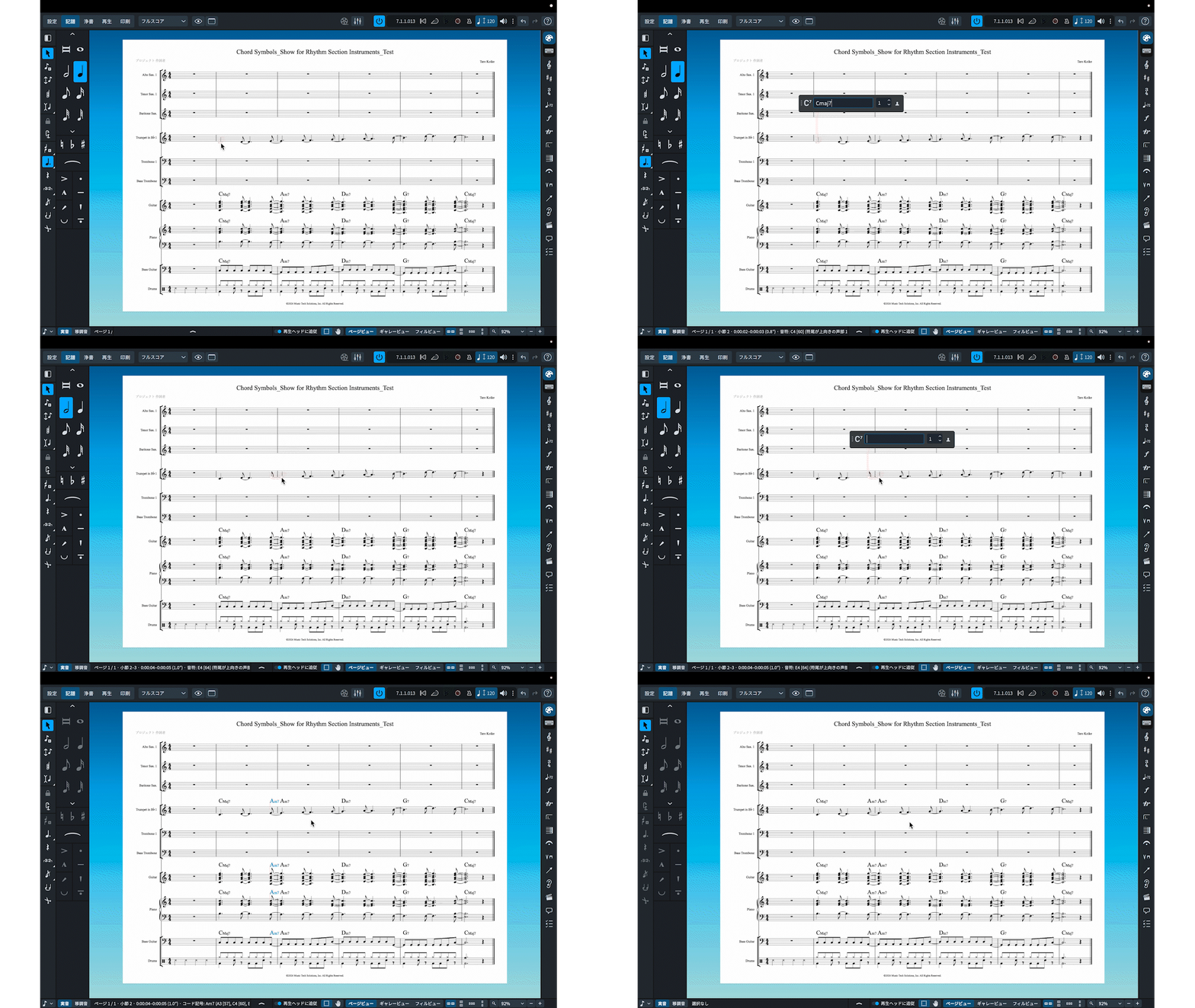
In the musical example above, the user is attempting to input CMaj7 on the first beat of the second bar, followed by Am7 on the first beat of the third bar, on the Trumpet in Bb staff.
For the CMaj7 on the first beat of the second bar, the popover displays "CMaj7" from the start—reflecting the chord symbol already assigned to the rhythm section for that beat. Consequently, simply pressing the Return key results in nothing being displayed. This occurs because the default setting for the Bb Trumpet—found under Setup mode—specifies that chord symbols should appear only on "rhythm section instruments".
While that aspect might be slightly confusing in itself, the real issue arises when entering a chord symbol for a phrase tied across the bar line via syncopation—such as at the first beat of the third measure.
Dorico’s handling of syncopation can sometimes lead to confusion
In Dorico, notes connected by ties are treated as a single entity. Consequently, if you attempt to input an "Am7" chord at the first beat of the third measure for a syncopated note, the program actually registers the new chord at the note's point of articulation—the "off-beat" of the fourth beat in the second measure.
Upon detecting this new chord symbol, Dorico likely determines that the instrument requires chord symbols. It then automatically switches the display setting from the default ("show on rhythm section instruments") to "show on all instruments". This results in behavior that is initially baffling: entering a single chord symbol causes chord symbols to appear across the entire rhythm section.
In cases without syncopation (like the second measure), if you input a chord symbol and nothing appears, you might check Setup mode, discover the "show in chord symbol and slash regions" option, and resolve the issue by selecting that setting.
However, when syncopation is involved (as in the third measure), a close look at the rhythm section staff after entering the Am7 reveals that an Am7 has also appeared at the off-beat of the fourth beat in the second measure. Noticing this detail can help you understand what happened and lead to a solution. In reality, however, your attention is often drawn to the—at first glance, puzzling and dramatic—behavior where multiple chord symbols entered for a rhythm instrument appear all at once; this often leads to the mistaken conclusion that the software is malfunctioning and it must be a bug.
Understanding Dorico's "Quirks"
This is simply one of Dorico's "quirks"—an aspect of the software that likely requires hands-on experience to truly internalize.
This phenomenon is particularly likely to occur in ensembles featuring a rhythm section with chord symbols while playing melodies that utilize syncopation; it is something to watch out for especially when dealing with scores for big bands or jazz/pop style wind orchestras.
