
Making Music Notation Software Sing (1): Dorico + Synthesizer V

When playing back vocal scores using music notation software, it was traditionally represented only by wordless melodies like "Ah". For a long time, KAWAI's ScoreMaker was practically the only option for adding lyrics to melodies.
However, recently, high-performance vocal synthesis plugins capable of adding lyrics have become popular. By using these in conjunction, it's now possible to play back lyrics as if a singer were employed, even in Dorico, Sibelius, and MuseScore.
While VOCALOID, released in 2003, was a representative vocal synthesis plugin, close integration with music notation software never became commonplace as a practical workflow.
In 2018, Synthesizer V, which employs AI-based vocal synthesis technology, was released. Its compatibility with Dorico, a music notation software with robust DAW-like features, was particularly strong, dramatically expanding the possibilities of "making music notation software sing".
Then, in 2026, Cantai was released, and Cantai support was listed as one of the main updates in Dorico 6.2.20, released at the end of April 2026.
While I would like to discuss Cantai in more detail later, this article will focus on the latest version of Synthesizer V, “Synthesizer V Studio 2 Pro” (hereinafter, Synthesizer V), developed by a Japanese company and highly compatible with Japanese lyrics. We will explain how to combine it with Dorico to play back vocals with lyrics within Dorico.
[Table of Contents]
(1) Channel settings
3. Dorico + Synthesizer V Playback and its Customization (with video sample)
---
1. Setting up Synthesizer V in Dorico
Steinberg's official YouTube channel released a video titled "Make Dorico Sing | Discover Dorico" on November 27, 2025. Following its content, we will first look at the setup method step-by-step using this 16-bar, 4-part band score (Vo/Key/Ba/Ds) as an example.
A 14-day trial version of Synthesizer V is available from Dreamtonics' official website. *
*Please note that the trial version limits input to 40 notes per group; notes exceeding this limit will not be rendered (the melody will be played back using Synthesizer V's system sound, but lyrics will not be on it).

(Return to Table of Contents)
(1) Exporting the MusicXML File from Dorico
First of all, export the MusicXML file from Dorico using "File Menu > Export > MusicXML".
This is for importing into Synthesizer V in the following steps, so it's best to export only the vocal layout.

(Return to Table of Contents)
(2) Loading Synthesizer V
Switch to playback mode in Dorico, and click the (+) button in the lower left corner of the "VST & MIDI Tab > VST Instruments" window to add a VST instrument slot.

After adding a VST instrument slot, select "Dreamtonics Co.,Ltd. > Synth > Synthesizer V Studio 2 Plugin" from the pull-down menu.
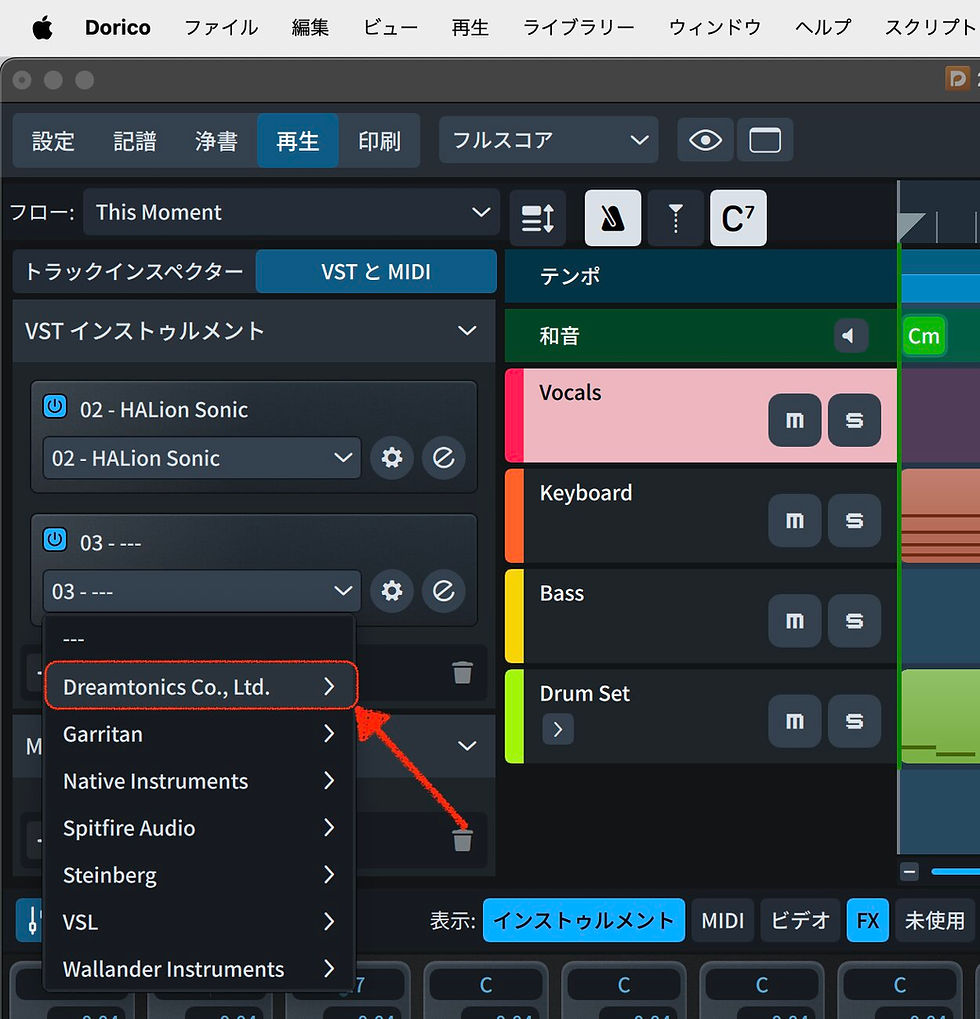
Click the (e) button in the lower right corner of the Synthesizer V Studio 2 Plugin slot to open the Synthesizer V Studio 2 Plugin window.

(Return to Table of Contents)
(3) Importing the MusicXML File into Synthesizer V
Drag and drop the MusicXML file exported from Dorico into the Synthesizer V window to import it.

Several dialogs will appear after dragging and dropping. Typically, for the first "Import Project", select "Open as a separate project", and for the second "Import Project", select "Do not save".

The contents of the imported MusicXML file will now be displayed in the Synthesizer V piano roll.
(Return to Table of Contents)
(4) Settings in Synthesizer V
Click the "Select Voice" button in the upper right corner to determine the type of voice to use.

Here, I've selected the most versatile "Ensemble vol.1."

By default, it's set to a unison of four singers, but since this is a band score intended for one vocalist, click the microphone icon at the top right of the window to display the Voice panel. Move the slider in "Unison" to the far left to set the number of singers to one.
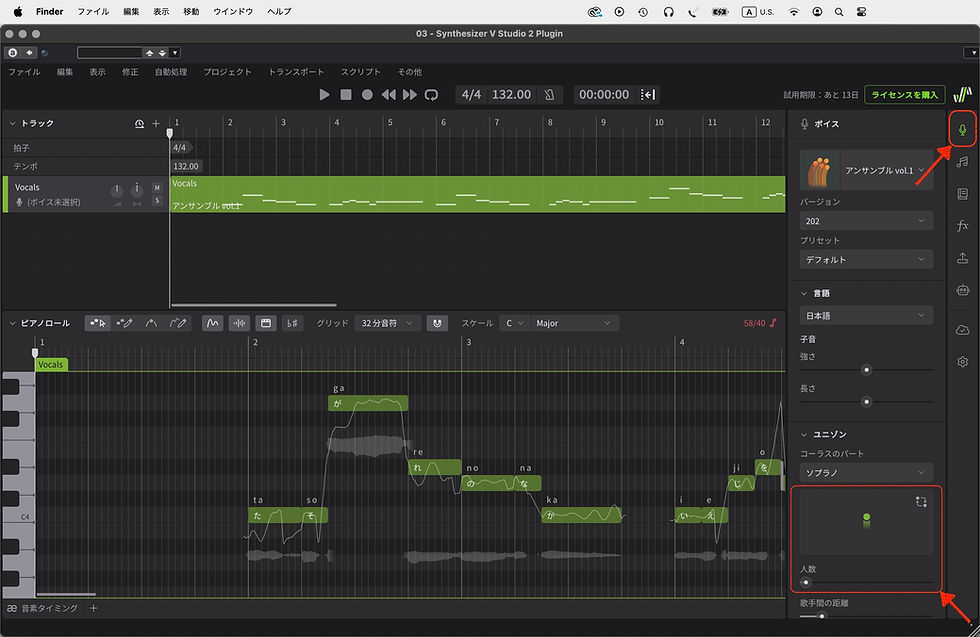
While the piano roll allows for individual adjustments of vocal timing, pitch, and breaths for each note, it often imports automatically in a good state from the start, so no fine-tuning would be necessary in most cases.
If no fine-tuning is required, the Synthesizer V settings are now complete.
(Return to Table of Contents)
2. Settings in Dorico
(1) Channel Settings
In Dorico, first of all select the Vocals track and set the port to 1 and the channel to 1 in "Track Inspector > Routing". If there are multiple singers, assign them to the channels in order.
This allows you to control vocal tracks using Synthesizer V from the Dorico mixer.

(Return to Table of Contents)
(2) Suppressing the Playback of Unwanted Notes
After selecting the first note, select the entire vocal line using "Edit Menu > Select to End of Flow," then check "Suppress playback" in "Properties > General" in the lower panel.
This prevents MIDI notes playing behind the vocals from playing during playback.


(Return to Table of Contents)
3. Dorico + Synthesizer V Playback and its Customization
Now, clicking the playback button will allow you to hear the playback with the Synthesizer V vocals added. ※
※[Note] This demo uses a trial version of Synthesizer V, so due to its specifications, the lyrics are cut off partway through. After the lyrics are cut off, "Suppress playback" is disabled to compensate by playing MIDI notes.
Incidentally, this is what it sounds like when Japanese lyrics are sung by the same voice.
Now all you need to do is to shape the sound using Dorico's mixer, applying effects as needed, while listening to the playback.
Dorico has a reverb set for all tracks' SENDS, so it's a good idea to start by turning this on and applying a slightly deep reverb on the vocal track.
By clicking the semicircular button at the top of the window and opening the Live Stage dialog, you can easily add depth to the sound by adjusting the spatial placement of the vocal and instruments.

(Return to Table of Contents)
4. Points to Note When Using Synthesizer V in Dorico
Synthesizer V is basically intended for use within DAWs. While Synthesizer V works at a practical level even in Dorico, which has a strong DAW-like character among music notation software, there are some limitations that should be noted.
Only one flow can be set per project. (Flow is a concept unique to Dorico and not found in other products; it won’t be recognized by Synthesizer V.)
Synthesizer V does not recognize repeat signs in music notation software, so you need to create a separate project for playback that does not use repeat signs.
Pickup measure may be ignored in Synthesizer V; in that case, you need to manually adjust the timing of the start of singing in Synthesizer V, or express the pickup measure differently (like normal measure with rests before notes).
Dynamics written in Dorico are not reflected in Synthesizer V's singing style, so you need to write them using Synthesizer V's Loudness setting or write the volume automation in Dorico.
For songs with many tempo changes using rit. and accel, first import the MIDI file from Dorico into Synthesizer V, and then import the MusicXML file into a separate track in Synthesizer V.
Furthermore, changes to lyrics in Dorico are not automatically reflected in Synthesizer V. Therefore, the recommended workflow is to complete the lyrics and composition in Dorico first, and then import the resulting MusicXML file into Synthesizer V.
While it is certainly possible to use Synthesizer V during the songwriting process, it's important to be aware that if you make minor adjustments in Synthesizer V and then change something in Dorico, the consistency between the two may be compromised, potentially requiring you to start over.
Currently, a bug has been confirmed where playback is disrupted if lyrics are present on the first beat of the first measure. According to Steinberg, this problem does not occur when exporting to an audio file.
*For details, please refer to "Limitations and Current Considerations When Using Synthesizer V with Dorico (56:24)" in Make Dorico Sing | Discover Dorico. The inclusion of a one-measure count-off at the beginning of the aforementioned YouTube demo video is a measure to avoid this issue.
Our Dorico intensive course is specifically designed for users migrating from Finale, covering not only music notation but also Dorico's DAW-like unique playback settings and the use of VST plugins, including Synthesizer V. If you are interested, please check this out.

For those considering migrating to Dorico due to the end of Finale support:
Online course for Finale users
"Dorico Intensive Course"
Learn Dorico quickly while understanding the differences from Finale.
(Return to Table of Contents)
---
Cantai, a vocal synthesis plug-in dedicated for music notation software, is an interesting product that not only has high quality but is as easy to use as NotePerformer, but as of the time of writing this article in mid-May 2026, it only supports English and Latin lyrics, not Japanese lyrics.
Synthesizer V, on the other hand, supports lyrics in a wide range of languages, including English, Spanish, Japanese, Korean, Chinese (Mandarin), and Cantonese. The ability to make individual fine-tuning adjustments to each verse of the lyrics is also a great advantage for music notation software users who want to be particular about playback.
There are many AI-based web apps available these days that generate audio from music data with lyrics, some of which are free.
However, some people may be hesitant to use them, given that it may not be clear what kind of vocal database is used to generate audio and how user information is protected.
On that point, Synthesizer V clearly states the AI ethics and data licensing policy and is also a Japanese company, so you can use it with confidence.
▼Synthesizer V Studio 2 Pro: Frequently Asked Questions (FAQ): What are Dreamtonics’ principles on AI ethics and data licensing? (Dreamtonics Co., Ltd.)
There is an interview article with Kanru Hua, the developer of Synthesizer V, written by Ken Fujimoto, a well-known writer in the DTM industry, so please read it if you are interested.
▼Why did a young Chinese genius start a business in Japan and make AI singing voice synthesis software a hit? Interview with Kanru Hua, developer of Synthesizer V (DTM Station, 2021.08.25)
(Return to Table of Contents)
