
Auto-Generating chord symbols from existing chords: Dorico vs. Sibelius

In the opposite of the previous article “How to automatically create an accompaniment track from chord symbols in Dorico”, this time I’m going to focus on the function to generate chord symbols from chords that have already been entered, and compare the generated results in Dorico and Sibelius.
[Table of Contents]
2. Comparison of generated results
2-1. Major/minor chords
2-2. 7th chords
2-3. Dim/Aug chords
2-4. Sus chords
2-5. Other chords
ーーー
1. Function to generate chord symbols
In Dorico, right-click after selecting a range and select “Chord Symbols and Diagrams > Generate Chord Symbols from Selection”, while in Sibelius, select a range and select “Text tab > Plug-ins > Add Chord Symbols” to add chord symbols to multiple chords in one operation.

In each product, a dialog box for setting the details of the process will be displayed just before generating chord symbols.
Dorico has more settings than Sibelius, and has a wide range of options to improve the accuracy of generation depending on the case, including whether or not to take into account the note values of the notes in the target area when generating chord symbols.


(Back to Table of Contents)
2. Comparison of generated results
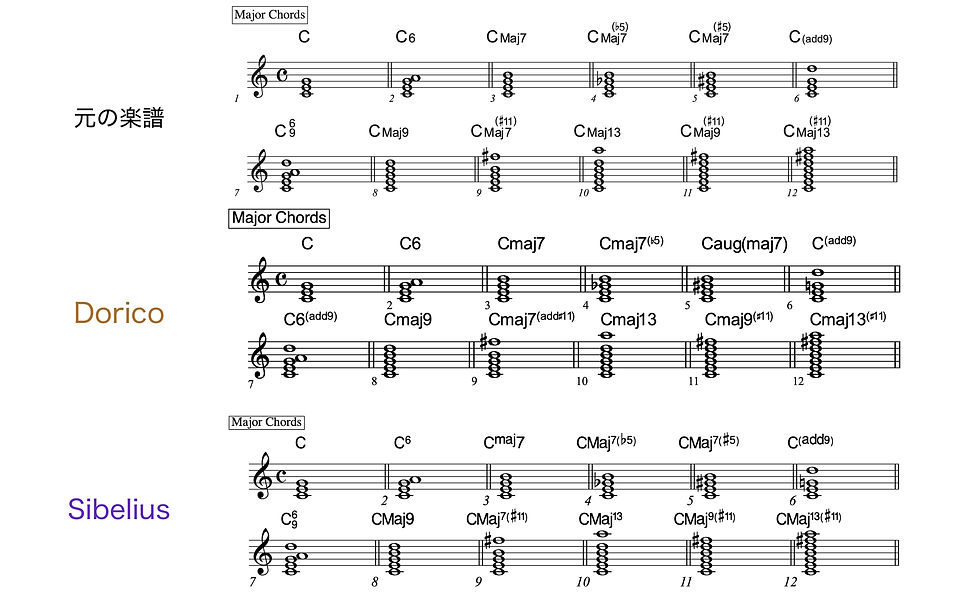
In this experiment, I created the following test file in Finale v27, loaded the MusicXML file with only the chord symbols deleted into Dorico and Sibelius, and applied each chord symbol generation function.

(Back to Table of Contents)
2-1. Major/minor chords
All major and minor chords, including tensions such as #5, ♭5, #11th, and 13th, were created as expected in both products.

(Back to Table of Contents)
2-2. 7th chords
Even in the case of 7th chords, which have many types and combinations of altered tensions, Dorico created all chord symbols as expected.

On the other hand, Sibelius sometimes generated slightly questionable chords.

It is unclear why such an interpretation is made, but in the case of Sibelius, the learning resources of this function controlled by its own AI do not currently support such jazz block chords, which may be one of the reasons. *
*Joe Plazak (PhD) & Néstor Nápoles López (PhD): “Data-driven workflows within Sibelius”, JUNE 22, 2023
However, if you know in advance that such an interpretation could be shown, you will be less likely to use impractical expressions when actually using it.
(Back to Table of Contents)
2-3. Dim/Aug chords
In Dorico, when B double flat is written as A enharmonically in Cdim7, it seems to be recognized as a 13th tension.

(Back to Table of Contents)
2-4. Sus chords
I don't notice any problems in Dorico. Sibelius generally does not have any problems, but when altered tensions such as ♭9th are used, it seems that the interpretation may be somewhat complicated.

(Back to Table of Contents)
2-5. Other chords
Finally, I tried out a few miscellaneous chords such as inversions, hybrid chords, and omit chords.
E/C and Cm7(omit5) may have been a bit of a stretch, but I think that both Dorico and Sibelius generated chord symbols that generally did not sound too strange.
As for the C/G in measure 57, Dorico interprets it as “C” by default, but you can change the lowest bass note from the default F to A in “Generate chord symbols from selection > Detect inversions” to interpret it as “C/G”.

(Back to Table of Contents)
3. How to make use of this function?
The ability to generate chord symbols from existing chords may be less in demand as a feature of music notation software than the reverse (the ability to generate notes from chord symbols).
This is because most users of music notation software generally have a certain level of musical literacy, and if they write complex-sounding chords, it seems that this is often done intentionally.
In that case, the constituent notes of the chord and the function of each note are already in mind, so when visualizing this on a score in the form of a chord symbol, there is not much need to rely on an automatic generation function whose results are uncertain.
I think that the ability to generate chord symbols from existing chords may be useful when roughly analyzing the harmonic structure of a piece written by someone else.
The example below is the famous classical guitar piece “Recuerdos de la Alhambra” to which Dorico's chord symbol generation function has been applied. For pieces with a clear sense of chords, such as this one that mainly uses arpeggios, automatic chord symbol generation seems to be practical.
By extracting this chord symbol, you may be able to save some effort when arranging, for example by adding string accompaniment to this piece.

ーーー
The significant evolution of the chord symbol customization function in Dorico Pro 6 led me to wonder, “So what is the current state of Sibelius, a rival product?” So for the past two months, I have been intensively researching the chord symbol-related functions of Dorico and Sibelius and summarizing the results on my blog.
Until now, the main function of music notation software has been to place notes and rests on the staff.
The function related to chord symbols is a separate system, but I think this is an important function for music notation software to expand its user base beyond the classical genre, which has been its main focus until now, to other genres including pop.
The wider the user base and the larger the market, the more development of music notation software will progress, and the emergence of more high-performance products may also contribute to the development of music culture.
In that sense, I would like to see the chord symbol features in Dorico and Sibelius become easier to understand and use, and I will be keeping a close eye on future developments.
(Back to Table of Contents)
